
Sell products in DMs with UPI checkout
Quick answer
Add a product in Store → Products (name, price, what to deliver). In an automation, choose “Sell a product”. Commenters get a product card with a Pay button; after payment, DMBridge sends the course link, file or message automatically. Pro feature.
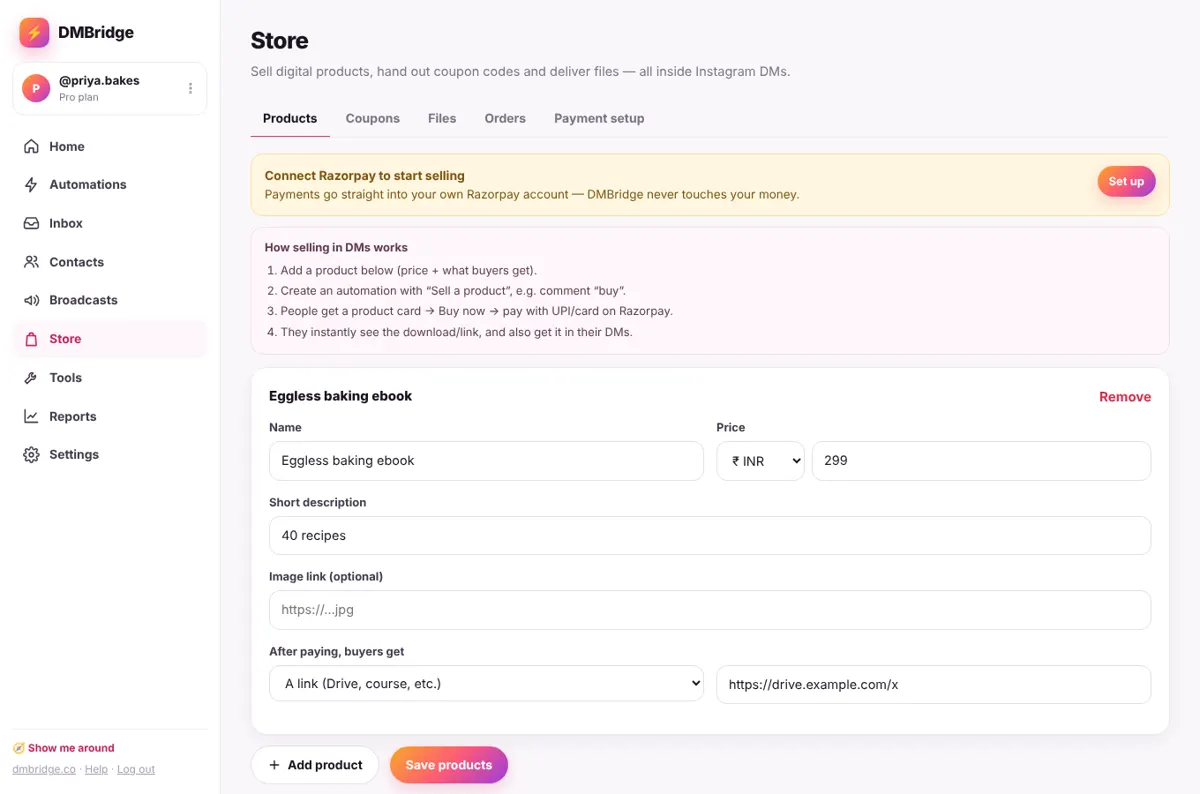
- Store → Products → Add product: name, price, description and what to deliver (a link, a file from Store → Files, or a message).
- Make sure Razorpay is connected (Store → Payment setup).
- Create an automation, e.g. comment
BUY→ Sell a product → choose the product.
Several products? Use a product carousel so people can swipe and pick.
Related articles
🛍️ Store & payments
Connect Razorpay to get paidSell products in DMs with UPI checkoutUnique coupon codesDeliver files (PDFs, guides)Orders and paymentsStill stuck? Email [email protected] — we usually reply within a day. · All help articles
Frequently asked questions
Who handles refunds?
You do, from your Razorpay dashboard — the money is in your account.
Try DMBridge free
Connect Instagram in 30 seconds. 100 auto-DMs a month free — no card needed.
Continue with Instagram