
Connect Razorpay to get paid
Quick answer
Go to Store → Payment setup, paste your Razorpay Key ID and Key Secret and save. Payments go directly to your Razorpay account — DMBridge takes no commission. Pro feature.
- In Razorpay, open Account & Settings → API Keys and generate a key (Test mode to try, Live mode to sell).
- In DMBridge, open Store → Payment setup.
- Paste the Key ID and Key Secret and click Save. DMBridge checks the keys with Razorpay before saving.
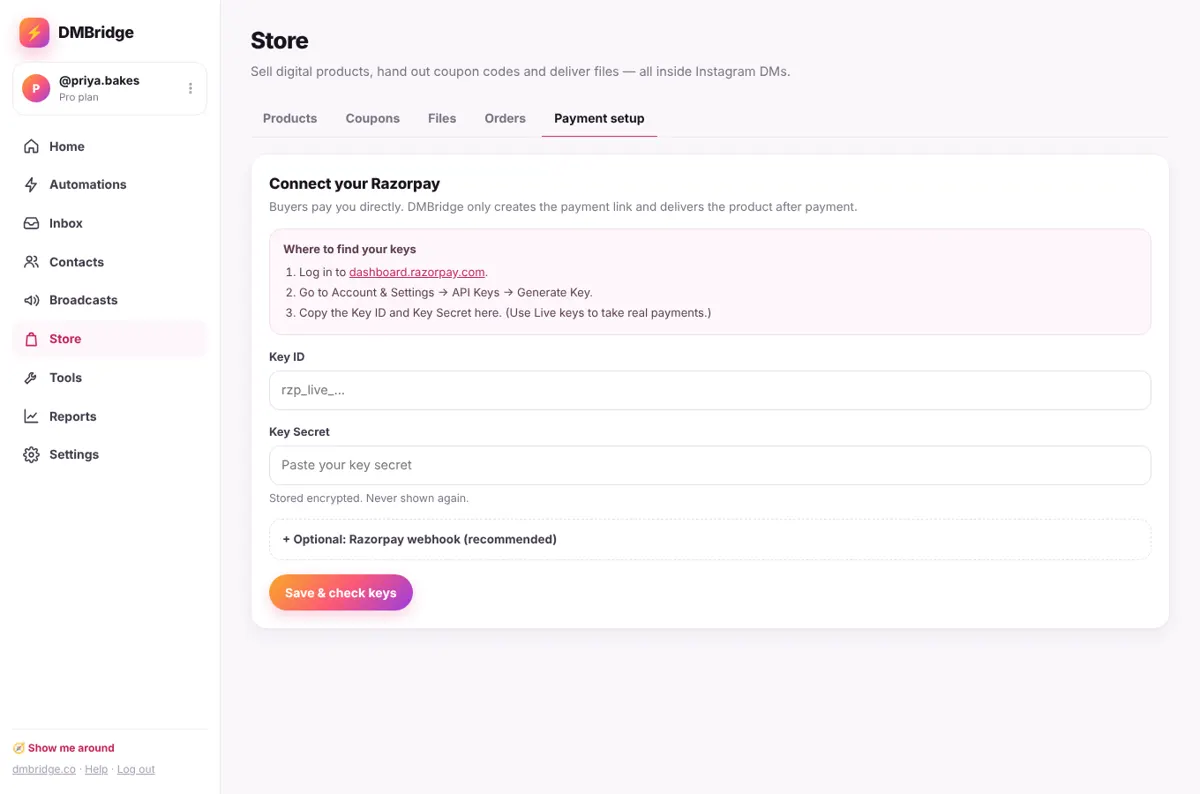
Your Razorpay secret is stored encrypted and never shown again.
Related articles
🛍️ Store & payments
Connect Razorpay to get paidSell products in DMs with UPI checkoutUnique coupon codesDeliver files (PDFs, guides)Orders and paymentsStill stuck? Email [email protected] — we usually reply within a day. · All help articles
Try DMBridge free
Connect Instagram in 30 seconds. 100 auto-DMs a month free — no card needed.
Continue with Instagram